 BatchOwl
How to remove a class schedule from Google Calendar after the semester
Updated October 28, 2026
The semester is over, but Econ 101 still shows up every Tuesday. How you clear it depends on how the classes got into your calendar, so start by finding out.
Step 1: How did the classes get there?
Click one class and look at the details:
- It says something like "Weekly on Tuesday": it's a repeating event, created by you or shared with you. See step 2a.
- It belongs to a calendar listed under "Other calendars" on the left, often with your school's name: you subscribed to it. See step 2b.
- Neither, and every class is its own event: the schedule was probably imported from a file your school portal gave you. See step 2c.
Step 2a: Repeating classes
Open the first class after your last day of term, click Delete event (the bin icon) and choose This and following events. The classes you attended stay as a record; everything after is removed. To remove the whole course, choose All events instead. Repeat for each course.
Step 2b: A subscribed school calendar
Hover over the calendar's name in the left sidebar, click the three dots and choose Settings, then Unsubscribe at the bottom. It disappears from your calendar; nothing changes for anyone else. If you just want it out of sight for now, untick it in the sidebar instead.
Step 2c: Classes imported from a file
Imported classes are separate events, so Google Calendar makes you delete them one at a time. Two shortcuts:
- If you imported them into their own calendar, delete that calendar: Settings, click it under Settings for my calendars, then Remove calendar and Delete.
- If they went into your main calendar, use a bulk tool. In Calendar Bulk, a Chrome extension we make, pick the calendar and a date range from your last day of term to the end of the year, type the course name into Title contains (or leave it empty to see everything), tick the classes and press Delete.
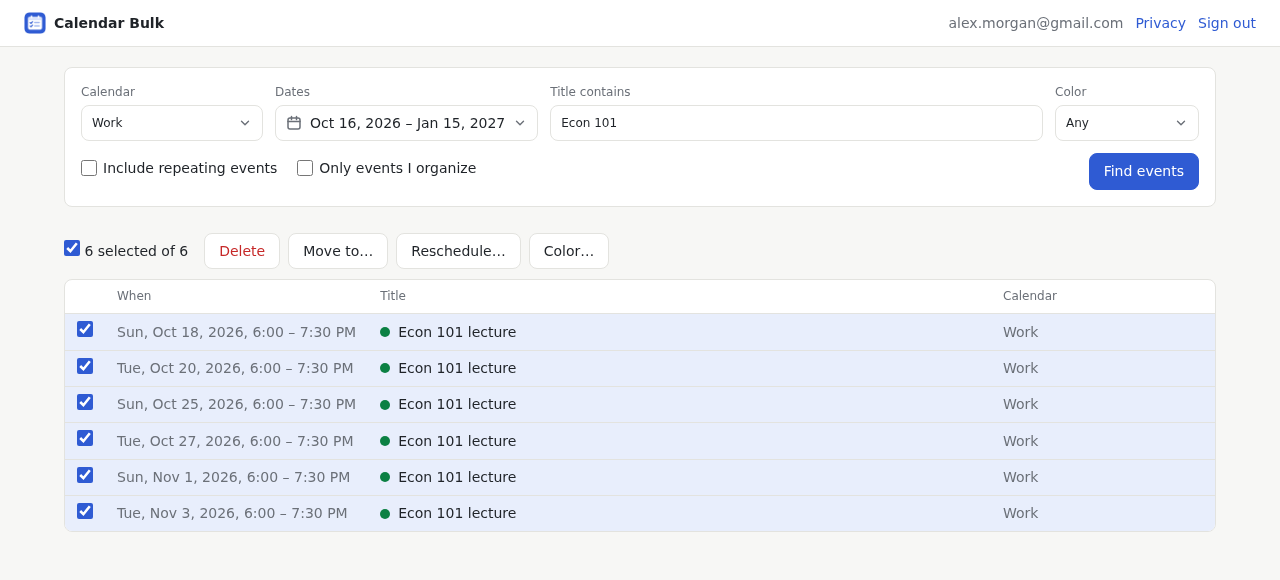
If you picked the wrong ones, Undo last action brings them back. For more on deleting by name, see how to delete all events with the same name.
For teachers: classes with students as guests
If your students are guests on the class events, deleting them can email everyone a cancellation. Google Calendar asks whether to notify guests when you delete; in Calendar Bulk the default is not to email them, and you can choose to. Deleting removes the events from your students' calendars too, because you're the organizer.
Next semester
Set an end date when you create repeating classes (Custom repeat, then Ends on your last day of term), and import school files into a calendar of their own. Next time, cleaning up takes one click.
Clear a whole semester in one go
Calendar Bulk finds the classes by name and date, deletes them together, and can undo. Your first 30 events are free; after that it's a one-time $9.
See Calendar BulkMore guides
- How to undo a Google Calendar import and remove duplicate eventsTell real duplicates from a calendar shown twice, then clean up the extra copies.
- How to move multiple Google Calendar events at onceMove a batch to another calendar, or push a whole week of meetings later.
- How to delete all events with the same name in Google CalendarRemove a repeating series, or dozens of separate events that share a name.
- How to delete all events from a Google Calendar (and keep the calendar)Empty your main calendar, a secondary one, or just one date range.
- How to delete past events in Google CalendarClear out years of old events, keep running series going, and back up first.