 BatchOwl
How to delete all events with the same name in Google Calendar
Updated October 16, 2026
A course ended, a weekly class was cancelled, or a meeting got added dozens of times. Whether you can remove them in one go depends on one thing: are they a repeating series, or separate events that only share a name?
Step 1: Check whether it's a repeating series
Click one of the events. If you see a line like "Weekly on Tuesday" under the date, it's a repeating event. If there's no such line, each event was created on its own.
If it's a repeating series: delete it in one go
- Click any occurrence and press Delete event (the bin icon).
- Choose All events to remove the whole series, or This and following events to keep the past ones and stop it from today.
That's all. If several series share the same name, repeat this for each one.
If they're separate events: three ways
Google Calendar has no way to select many events at once, so separate events need one of these.
1. One at a time with search (free, fine for a handful)
- Type the name into the search box at the top of Google Calendar. You get a list of every matching event.
- Click each one and press Delete event.
Search matches words anywhere in the event, including the description and location, so read each result before deleting it.
2. A short Apps Script (free, for people comfortable with code)
Google Apps Script can delete events by name from your main calendar. Open script.google.com, create a new project, paste this in, change the name and dates, and press Run:
function deleteEventsNamed() {
  const title = 'Econ 101 lecture';            // the exact event name
  const from = new Date('2026-01-01');
  const to = new Date('2027-01-01');
  const cal = CalendarApp.getDefaultCalendar(); // your main calendar
  const events = cal.getEvents(from, to, { search: title })
    .filter(e => e.getTitle() === title);
  Logger.log('Found ' + events.length + ' events');
  events.forEach(e => e.deleteEvent());
}- Run it once with the last line deleted first, and check the count in the log. There's no preview and no undo, only the calendar's trash.
- Google asks you to authorize the script, and may warn that the app isn't verified because it's your own. Click Advanced to continue.
- Use it for separate events only. Delete repeating series in Google Calendar itself, as above.
- If it stops with an error about too many changes, Google is rate-limiting you. Wait a few minutes and run it again.
3. A bulk tool (fastest, with a preview and undo)
Calendar Bulk is a Chrome extension we make for exactly this:
- Pick the calendar (or All calendars I can edit) and the date range.
- Type part of the name into Title contains. Capital letters don't matter, so "econ 101" also finds "Econ 101 lecture".
- Click Find events, check the list, and tick the ones to remove. The checkbox at the top selects them all.
- Press Delete. If the events have guests, you choose whether they get a cancellation email; the default is not to send one.
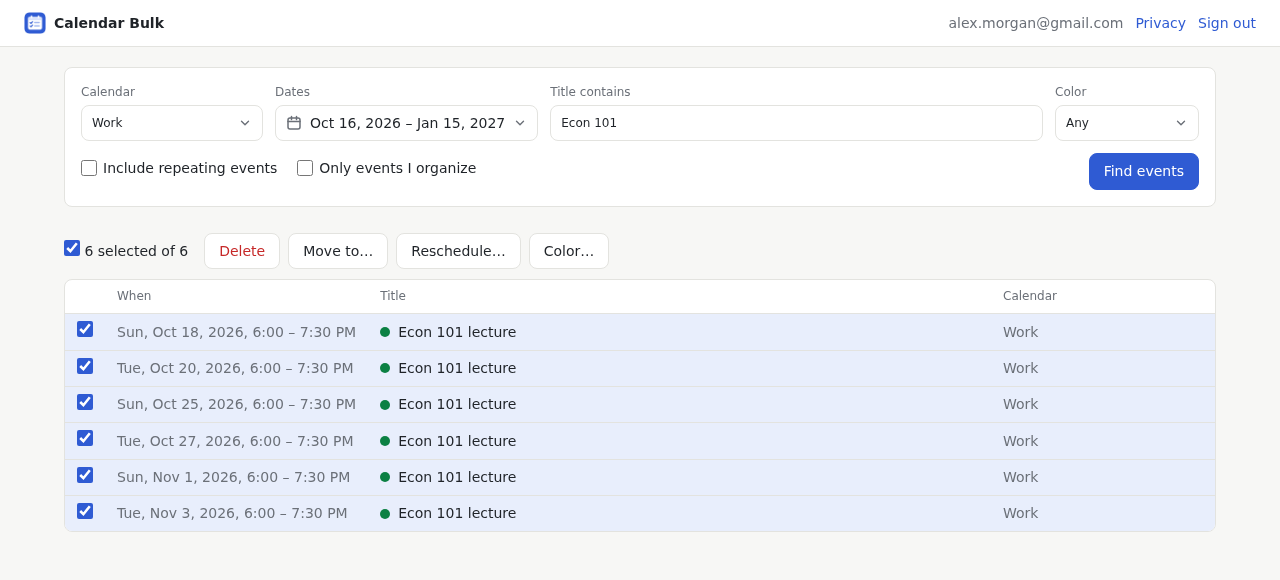
If you deleted the wrong ones, Undo last action brings them back. Tick Include repeating events to also list single occurrences of a series.
If you deleted something by mistake
Deleted events stay in the calendar's trash for 30 days. Open Settings (the gear at the top right), choose Trash, tick the events and click Restore all selected.
Delete every event with that name in one go
Calendar Bulk finds them by name, shows you the list, and can undo. Your first 30 events are free; after that it's a one-time $9.
See Calendar Bulk